Blog API with Node Js

Introduction
Blogs are an essential part of the modern web, and they continue to be popular platforms for sharing information and ideas. In this article, we will discuss how to design a simple and efficient blog API using Node.js.
Node.js is a popular platform for building web applications and APIs, and it is particularly well-suited for building a blog API. Node.js is a JavaScript runtime that allows developers to run JavaScript on the server side. This means that you can use the same language for both the front end and the back end of your application.
Prerequisites
To follow along in this tutorial, you will need to have knowledge of these technologies and also have them installed on your local machine:
Javascript
Node Js
MongoDB & Mongoose
Express
Firebase
About Our Blog API
For our API, we will create a simple CRUD application where we can create, read, update and delete blog articles. We will use the Express web framework. Express is a popular web framework for Node.js that makes it easy to build web applications and APIs. It provides a simple and easy-to-use routing system, which allows you to define routes that match specific URLs.
We will use MongoDB as our database for this project. MongoDB is a popular choice for building a blog API because it is a document-based database, which makes it easy to store and retrieve data in a format that is similar to JSON.
We will also use Firebase to handle our authentication and authorization to protected routes.
To follow along, you can find the source code on Github.
Setting Up The Project
We will start by creating a Node JS project by running the command below.
npm init
We would also need to install some dependencies that are necessary for the project
npm install express nodemon body-parser dotenv joi mongodb-memory-server mongoose mongoose-seed firebase firebase-admin
Once the packages have been installed, our package.json file would be like this.
{
  "name": "blog-api",
  "version": "1.0.0",
  "main": "app.js",
  "scripts": {
    "start:dev": "nodemon app.js",
    "start:prod": "node app.js"
  },
  "author": "Ekene Chukwurah",
  "license": "ISC",
  "description": "",
  "dependencies": {
    "bcrypt": "^5.1.0",
    "body-parser": "^1.20.1",
    "dotenv": "^16.0.3",
    "express": "^4.18.2",
    "firebase": "^9.15.0",
    "firebase-admin": "^11.4.1",
    "joi": "^17.7.0",
    "mongodb-memory-server": "^8.10.0",
    "mongoose": "^6.7.0",
    "mongoose-seed": "^0.6.0"
  },
  "devDependencies": {
    "nodemon": "^2.0.20"
  }
}
We also edit the scripts in the package.json file and run npm run start:dev on the command line.
Creating Our Blog API
For our blog API, we will need to create some folders that will hold our files. The files we will create are config, middlewares, models, controllers, routes and validators. we will also need to create our .env and .gitignore files by running these commands.
mkdir config middlewares models controllers routes validators
touch .env .gitignore
Database Configuration
We will create a config/db.config.js file and put our database configuration
//  config/db.config.js
const mongoose = require("mongoose");
require('dotenv').config();

function connectToMongoDB() {
    mongoose.connect(process.env.MONGO_URI, { useNewUrlParser: true, useUnifiedTopology: true });
    db = mongoose.connection;

    db.on("connected", () => {
        console.log("Connected to database successfully !");
    });

    db.on("error", (err) => {
        console.log("An error occured while connecting to the database", err);
    });
}

module.exports = { connectToMongoDB }
In our app.js file, we will set up our server, connect our database and handle our errors.
//  app.js
const express = require("express");
const bodyParser = require("body-parser");

// custom imports
const db = require("./config/db.config");


db.connectToMongoDB();
require("dotenv").config();

PORT = process.env.PORT;
const app = express();

app.use(bodyParser.json());
app.use(bodyParser.urlencoded({ extended: false }));

app.get("/api/v1/", (req, res) => {
    res.send("Blogging Api Sweet!");
});
app.get("/", (req, res) => {
    res.send("Blogging Api Sweet!");
});

// Handle errors.
app.use(function (err, req, res, next) {
    console.log(err);
    res.status(err.status || 500);
    res.json({ error: err.message });
});

app.listen(PORT, () => {
    console.log(`Listening on port: ${PORT}`);
});

module.exports = app;
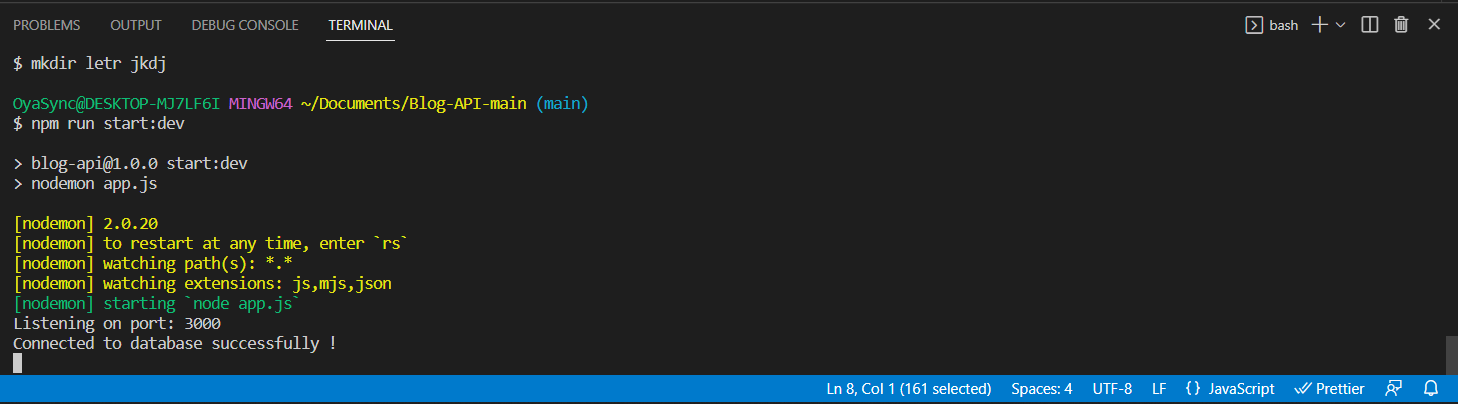
After running npm run start:dev command, we should see this on our terminal
Firebase Configuration
We will start by creating our config/firebase.config.js file, we will add our firebase configuration gotten from our firebase console and initialize our app.
require("dotenv").config();

const admin = require("firebase-admin");
const { initializeApp } = require("firebase/app");
const { getAuth } = require("firebase/auth");

const firebaseConfig = {
    apiKey: process.env.FIREBASE_API_KEY,
    authDomain: process.env.FIREBASE_AUTH_DOMAIN,
    projectId: process.env.FIREBASE_PROJECT_ID,
    storageBucket: process.env.FIREBASE_STORAGE_BUCKET,
    messagingSenderId: process.env.FIREBASE_MESSAGING_ID,
    appId: process.env.FIREBASE_APP_ID,
    measurementId: process.env.FIREBASE_MEASUREMENT_ID,
};

// Initialize Firebase
const app = initializeApp(firebaseConfig);
const auth = getAuth(app);

module.exports = { auth };
Models
We will create our User and Article models in our model/user.model.js and model/article.model.js files respectively. In our user.model.js file, we will define our user schema and write a function to ensure our password is encrypted before it is saved in the database and another function to compare if the password inputted during login is valid.
// model/user.model.js

const mongoose = require("mongoose");
const bcrypt = require("bcrypt");

// Define a schema
const Schema = mongoose.Schema;

// Define user schema
const userSchema = new Schema({
    firstName: {
        type: String,
        required: true,
    },
    lastName: {
        type: String,
        required: true,
    },
    userName: {
        type: String,
        unique: true,
    },
    email: {
        type: String,
        required: true,
        unique: true,
    },
    password: {
        type: String,
        required: true,
    },
    created: {
        type: Date,
        default: Date.now,
    },
});

userSchema.pre("save", async function (next) {
    const user = this;
    const hash = await bcrypt.hash(this.password, 10);

    this.password = hash;
    next();
});

userSchema.methods.isValidPassword = async function (password) {
    const user = this;
    const compare = await bcrypt.compare(password, user.password);

    return compare;
};

const userModel = mongoose.model("Users", userSchema);
module.exports = userModel;
In our model/article.model.js , we define our article schema and export our model
//  models/article.model.js

const moogoose = require("mongoose");

//Define a schema
const Schema = moogoose.Schema;

//Define article schema
const articleSchema = new Schema(
    {
        title: {
            type: String,
            required: true,
        },
        description: {
            type: String,
        },
        tags: {
            type: [String],
        },
        author: {
            type: Schema.Types.ObjectId,
            ref: "Users",
        },
        state: {
            type: String,
            enum: ["Draft", "Published"],
            default: "Draft",
        },
        read_count: {
            type: Number,
            default:0
        },
        reading_time: {
            type: Number,
        },
        body: {
            type: String,
            required: true,
        },
    },
    { timestamps: true }
);

articleSchema.index({ title: 1, author: 1 }, { unique: true });

const articleModel = moogoose.model("Articles", articleSchema);
module.exports = articleModel;
Validators
We will be using Joi to create validations for our article and user inputs. For our user inputs, we will create the addUserValidator and updateUserValidator in our validators/user.validator.js file
const Joi = require("joi");

const addUserValidator = Joi.object()
    .keys({
        userName: Joi.string().alphanum().required().label("Username"),
        password: Joi.string().pattern(new RegExp("^[a-zA-Z0-9]{3,30}$")),
        confirmPassword: Joi.any()
            .equal(Joi.ref("password"))
            .label("Confirm Password")
            .messages({
                "any.only": "Confirm Password does not match Password",
            }),
        firstName: Joi.string().required().label("First Name"),
        lastName: Joi.string().required().label("Last name"),
        email: Joi.string().email({
            minDomainSegments: 2,
            tlds: { allow: ["com", "net"] },
        }),
        createAt: Joi.date().default(Date.now()),
    })
    .with("password", "confirmPassword");

const updateUserValidator = Joi.object()
    .keys({
        userName: Joi.string().alphanum().label("Username"),
        password: Joi.string().pattern(new RegExp("^[a-zA-Z0-9]{3,30}$")),
        confirmPassword: Joi.any()
            .equal(Joi.ref("password"))
            .label("Confirm Password")
            .messages({
                "any.only": "Confirm Password does not match Password",
            }),
        firstName: Joi.string().label("First Name"),
        lastName: Joi.string().label("Last name"),
        email: Joi.string().email({
            minDomainSegments: 2,
            tlds: { allow: ["com", "net"] },
        }),
        createAt: Joi.date().default(Date.now()),
    })
    .with("password", "confirmPassword");

module.exports = { addUserValidator, updateUserValidator };
For our article inputs, we will create our articleAddValidator and articleUpdateValidator in our validators/article.validator.js file
const Joi = require("joi");

const articleAddValidator = Joi.object({
    title: Joi.string().min(5).max(255).trim().required(),
    description: Joi.string().min(5).optional().trim(),
    tags: Joi.array().items(Joi.string()),
    body: Joi.string().min(10).required(),
    state: Joi.string().default("Draft"),
});

const articleUpdateValidator = Joi.object({
    title: Joi.string().min(5).max(255).trim(),
    description: Joi.string().min(5).trim(),
    tags: Joi.array().items(Joi.string()),
    body: Joi.string().min(10),
    state: Joi.string(),
});

module.exports = {
    articleAddValidator,
    articleUpdateValidator,
};
Middlewares
We will create middlewares for our authentication, article and user routes.
The authentication middleware will ensure access to restricted routes is inaccessible to unauthorized users. We will create our authentication on our middlewares/auth.middleware.js file .
const { getAuth } = require("firebase/auth");

const userModel = require("../models/user.model");

module.exports = async function authentication(req, res, next) {
    try {
        if (req.headers.authorization?.split(" ")[0] !== "Bearer") {
            return res.status(401).json({
                type: "error",
                message: "Token not a Bearer Token",
            });
        }
        const firebaseToken = req.headers.authorization?.split(" ")[1];

        let firebaseUser;
        if (firebaseToken) {
            firebaseUser = await getAuth().currentUser;
        }

        if (!firebaseUser) {
            // Unauthorized
            return res.status(401).json({
                type: "error",
                message: "Unauthorized",
            });
        }

        const user = await userModel
            .findOne({
                email: firebaseUser.email,
            })
            .select("-password");

        if (!user) {
            // Unauthorized
            return res.status(401).json({
                type: "error",
                message: "Unauthorized",
            });
        }

        req.user = user._id;

        next();
    } catch (err) {
        res.status(401).json({
            type: "error",
            message: "Unauthorized",
        });
    }
};
The user middleware will use the user validators to check if the payload provided in the request body when adding a user and updating a user is valid. We will add these in our middlewares/user.middleware.js file.
const {
    addUserValidator,
    updateUserValidator,
} = require("../validators/user.validator");

const validateAddUserMiddleWare = async (req, res, next) => {
    const userPayload = req.body;
    try {
        await addUserValidator.validateAsync(userPayload);
        next();
    } catch (error) {
        return res.status(406).json({
            type: "error",
            message: error.message.replace(/"|'/g, ""),
        });
    }
};

const validateUpdateUserMiddleWare = async (req, res, next) => {
    const userPayload = req.body;
    try {
        await updateUserValidator.validateAsync(userPayload);
        next();
    } catch (error) {
        return res.status(406).json({
            type: "error",
            message: error.message.replace(/"|'/g, ""),
        });
    }
};

module.exports = { validateAddUserMiddleWare, validateUpdateUserMiddleWare };
The article middleware will use the article validators to check if the payload provided in the request body when adding an article and updating an article is valid. We will add these in our middlewares/article.middleware.js file.
const {
    articleAddValidator,
    articleUpdateValidator,
} = require("../validators/article.validator");

const addArticleMiddleware = async (req, res, next) => {
    const articlePayload = req.body;
    try {
        await articleAddValidator.validateAsync(articlePayload);
        next();
    } catch (error) {
        return res.status(406).json({
            type: "error",
            message: error.details[0].message.replace(/"|'/g, ""),
        });
    }
};

const updateArticleiddleware = async (req, res, next) => {
    const articlePayload = req.body;
    try {
        await articleUpdateValidator.validateAsync(articlePayload);
        next();
    } catch (error) {
        return res.status(406).json({
            type: "error",
            message: error.details[0].message.replace(/"|'/g, ""),
        });
    }
};

module.exports = {
    addArticleMiddleware,
    updateArticleiddleware,
};
Routes
We will create authentication, articles and user routes. We will make use of the Express Router. We will create our routes/auth.routes.js, routes/article.routes.js and routes/user.routes.js files.
The routes/auth.routes.js contains the login and signup routes with the loginController and signupContoller attached. We also add our validateAddUserMiddleWare middleware.
const express = require("express");
const { FirebaseError } = require("@firebase/util");

const userModel = require("../models/user.model");
const { validateAddUserMiddleWare } = require("../middlewares/user.middleware");

const authRouter = express.Router();

authRouter.post("/login", loginController);
authRouter.post("/signup", validateAddUserMiddleWare, signupController);

module.exports = authRouter;
The routes/user.route.js contains the edit/:id route to get a specific user using their id and / route to get all users and the updateUser and getAllUsers controllers attached. We also add our validateAddUserMiddleWare and authentication middlewares.
const express = require("express");

const userModel = require("../models/user.model");
const authentication = require("../middlewares/auth.middleware");
const {
    validateUpdateUserMiddleWare,
} = require("../middlewares/user.middleware");

const userRouter = express.Router();

userRouter.patch(
    "/edit/:id",
    authentication,
    validateUpdateUserMiddleWare,
    updateUser
);
userRouter.get("/", getAllUsers);

module.exports = userRouter;
The router/article.route.js contains the / route to get published articles, the /my-articles route to get articles by the logged-in user, the /post route to post an article, the /:id route to get an article by its id the /edit/:id and /delete/:id to edit and delete an article respectively. We also add our addArticleMiddleware, updateArticleiddleware and authentication middlewares.
const express = require("express");
const articleModel = require("../models/article.model");
const authentication = require("../middlewares/auth.middleware");
const {
    addArticleMiddleware,
    updateArticleiddleware,
} = require("../middlewares/article.middleware");

const articleRouter = express.Router();

articleRouter.get("/", articleController.getPublishedArticles);
articleRouter.get(
    "/my-articles",
    authentication,
    articleController.getArticlesByUser
);
articleRouter.post(
    "/post",
    authentication,
    addArticleMiddleware,
    articleController.postArticle
);
articleRouter.get("/:id", authentication, articleController.getArticleById);
articleRouter.patch(
    "/edit/:id",
    authentication,
    updateArticleiddleware,
    articleController.updateArticle
);
articleRouter.delete(
    "/delete/:id",
    authentication,
    articleController.deleteArticle
);

module.exports = articleRouter;
We will then register these routers in our app.js
const articleRouter = require("./routes/article.routes");
const userRouter = require("./routes/user.routes");
const authRouter = require("./routes/auth.routes");

app.use("/api/v1/articles", articleRouter);
app.use("/api/v1/users", userRouter);
app.use("/api/v1/auth", authRouter);
Let's move on to create our controllers
Controllers
First, let us create our controllers/auth.controller.js file and add our login and signup controllers
const { FirebaseError } = require("@firebase/util");
const {
    getAuth,
    createUserWithEmailAndPassword,
    signInWithEmailAndPassword,
} = require("firebase/auth");
const { auth } = require("../config/firebase.config");

const userModel = require("../models/user.model");

async function loginController(req, res, next) {
    try {
        const userPayload = {
            email: req.body.email,
            password: req.body.password,
        };
        if (!userPayload.email || !userPayload.password) {
            return res.status(401).json({
                message: "Email and Password are required",
            });
        }
        const userData = await userModel
            .findOne({ email: userPayload.email })
            .select(["-password", "-__v"]);
        const passw = await userModel
            .findOne({ email: userPayload.email })
            .select(["password"]);

        const user = await signInWithEmailAndPassword(
            auth,
            userPayload.email,
            userPayload.password
        );

        if (user && userData) {
            const tokenId = await getAuth().currentUser.getIdToken();
            const validate = await passw.isValidPassword(userPayload.password);
            if (!validate) {
                return res.status(403).json({
                    type: "error",
                    message: "Incorrect Password",
                });
            }

            return res.status(200).json({
                type: "Success",
                message: "Login successful",
                userData,
                tokenId,
            });
        } else {
            return res.status(401).json({
                type: "error",
                message: "user doesn't exist",
            });
        }
    } catch (error) {
        console.log(error);
        if (error instanceof FirebaseError) {
            if (error.code == "auth/user-not-found") {
                return res.status(404).json({
                    type: "error",
                    message: "User not found",
                });
            } else if (error.code == "auth/wrong-password") {
                return res.status(403).json({
                    type: "error",
                    message: "Incorrect Password",
                });
            } else {
                return res.status(403).json({
                    type: "error",
                    message: error.message,
                });
            }
        } else {
            return res.status(404).json({
                type: "error",
                message: error.message,
            });
        }
    }
}

async function signupController(req, res, next) {
    try {
        const userPayload = {
            email: req.body.email,
            firstName: req.body.firstName,
            lastName: req.body.lastName,
            userName: req.body.userName,
            password: req.body.password,
        };

        if (!userPayload.email || !userPayload.password) {
            return res.status(401).json({
                message: "Email and Password are required",
            });
        }
        const userExist = await userModel.findOne({
            email: userPayload.email,
            userName: userPayload.userName,
        });
        if (userExist) {
            return res.status(400).send({
                type: "error",
                message: "User already exists",
            });
        }

        const userResponse = await createUserWithEmailAndPassword(
            auth,
            userPayload.email,
            userPayload.password
        );

        if (userResponse) {
            newUser = await userModel.create({
                email: userPayload.email,
                firstName: userPayload.firstName,
                lastName: userPayload.lastName,
                userName: userPayload.userName,
                password: userPayload.password,
            });
        }
        return res.status(200).json({
            type: "Success",
            message: "Signup successful",
            user: {
                _id: newUser._id,
                firstName: newUser.firstName,
                lastName: newUser.lastName,
                userName: newUser.userName,
                email: newUser.email,
                created: newUser.created,
            },
        });
    } catch (error) {
        return res.status(404).json({
            type: "error",
            message: error["message"],
        });
    }
}

module.exports = {
    signupController,
    loginController,
};
We will export our controllers and import them in our routes/auth.routes.js file
const {
    signupController,
    loginController,
} = require("../controllers/auth.controller");
We will then create our controllers/user.controller.js file and add our getAllUsers and updateUser controllers
const express = require("express");

const userModel = require("../models/user.model");
async function getAllUsers(req, res, next) {
    try {
        const users = await userModel.find().select(["-password", "-__v"]);

        return res.status(200).json({
            type: "Success",
            users,
        });
    } catch (error) {
        return res.status(500).json({
            type: "error",
            message: "An error occured",
        });
    }
}

async function updateUser(req, res, next) {
    try {
        const id = req.params.id;
        const userId = req.user;
        const userData = req.body;

        const userToEdit = await userModel.findById({ _id: id });

        if (userToEdit) {
            const updatedUser = await userModel
                .findOneAndUpdate({ _id: id }, userData, { new: true })
                .select(["-password", "-__v"]);
            return res.status(200).json({
                type: "success",
                message: "User updated successfully",
                updatedUser,
            });
        } else {
            return res.status(404).json({
                type: "error",
                message: "User does not exist",
            });
        }
    } catch (error) {
        {
            console.log(error);
            return res.status(500).json({
                type: "error",
                message: "An error occured",
            });
        }
    }
}

module.exports = {
    getAllUsers,
    updateUser,
};
We will export our controllers and import them in our routes/user.routes.js file
const { getAllUsers, updateUser } = require("../controllers/user.controller");
We will then create our controllers/article.controller.js file and add our getPublishedArticles, postArticle, getArticleById, updateArticle, getArticlesByUser and deleteArticle controllers.
const { json } = require("body-parser");
const jwt = require("jsonwebtoken");
const express = require("express");
const articleModel = require("../models/article.model");
const userModel = require("../models/user.model");
require("dotenv").config();

async function getArticlesByUser(req, res) {
    try {
        const { query } = req;

        const { state, page = 0, per_page = 20 } = query;

        const findQuery = {};

        if (state) {
            findQuery.state = state;
        }
        const article = await articleModel
            .find(findQuery)
            .where("author")
            .equals(req.user)
            .skip(page)
            .limit(per_page);
        return res.status(200).json({
            type: "Success",
            article,
        });
    } catch (error) {
        // console.log(error);
        return res.status(404).json({
            type: "error",
            message: "Unable to get articles",
        });
    }
}

async function getPublishedArticles(req, res) {
    try {
        const { query } = req;

        const {
            tags,
            author,
            title,
            order = "asc",
            order_by = "createdAt",
            page = 0,
            per_page = 20,
        } = query;

        const findQuery = {};
        const sortQuery = {};

        if (author) {
            const user = await userModel.findOne({ userName: author });
            findQuery.author = user._id;
        }

        if (tags) {
            const arr = tags.split(",");
            findQuery.tags = { $in: arr };
        }

        if (title) {
            findQuery.title = title;
        }

        const sortAttributes = order_by.split(",");

        for (const attribute of sortAttributes) {
            if (order === "asc" && order_by) {
                sortQuery[attribute] = 1;
            }

            if (order === "desc" && order_by) {
                sortQuery[attribute] = -1;
            }
        }

        const articles = await articleModel
            .find(findQuery)
            .where("state")
            .equals("Published")
            .populate("author", "-password")
            .sort(sortQuery)
            .skip(page)
            .limit(per_page);
        res.status(200).json({
            type: "success",
            count: articles.length,
            articles,
        });
    } catch (error) {
        return res.status(404).json({
            type: "error",
            message: "Unable to get published articles",
        });
    }
}

async function postArticle(req, res) {
    try {
        const article = req.body;
        article.timestamp = new Date();
        article.author = req.user;
        article.reading_time = Math.ceil(
            (article.title.split.length + article.body.split.length) / 200
        );
        newArticle = await articleModel.create(article);
        return res.status(200).json({
            type: "Success",
            message: "Article posted successfully",
            newArticle,
        });
    } catch (error) {
        if (error.code === 11000) {
            return res.status(400).json({
                type: "error",
                message: "Article with this title exists",
            });
        } else {
            return res.status(500).json({
                type: "error",
                message: "Unable to post article",
            });
        }
    }
}

async function getArticleById(req, res) {
    const id = req.params.id;
    try {
        const article = await articleModel
            .findById({ _id: id })
            .where("status")
            .equals("Published")
            .populate("author", "-password");

        article.read_count++;
        article.save({ timestamps: false });
        if (!article) {
            res.status(404).json({
                type: "error",
                message: "Article not found",
            });
        } else {
            res.status(200).json({
                type: "Success",
                article,
            });
        }
    } catch (err) {
        res.status(404).json({
            type: "error",
            message: "Article not found",
        });
    }
}

async function updateArticle(req, res) {
    try {
        const id = req.params.id;
        const userId = req.user;
        const article = req.body;

        const articleToEdit = await articleModel.findById({ _id: id });

        if (userId._id.toString() === articleToEdit.author.toString()) {
            try {
                const updatedArticle = await articleModel.findOneAndUpdate(
                    { _id: id },
                    article,
                    { new: true }
                );
                return res.status(200).json({
                    type: "success",
                    message: "Article updated successfully",
                    updatedArticle,
                });
            } catch (error) {
                return res.status(500).json({
                    type: "error",
                    message: "Something went wrong please try again",
                });
            }
        } else {
            return res.status(401).json({
                type: "error",
                message: "You are not allowed to update this article",
            });
        }
    } catch (error) {
        return res.status(404).json({
            type: "error",
            message: "Article does not exist",
        });
    }
}

async function deleteArticle(req, res) {
    try {
        const id = req.params.id;
        const userId = req.user;
        if (!id) {
            res.status(200).json({ message: "This article does not exist" });
        }

        const articleTodelete = await articleModel.findById({ _id: id });

        if (userId._id.toString() === articleTodelete.author.toString()) {
            const article = await articleModel.findOneAndRemove({ _id: id });
            return res.status(200).json({
                type: "Success",
                message: "Article Deleted",
            });
        }
    } catch (error) {
        return res.status(404).json({
            type: "error",
            message: "Article not found",
        });
    }
}

module.exports = {
    getPublishedArticles,
    postArticle,
    getArticleById,
    updateArticle,
    getArticlesByUser,
    deleteArticle,
};
We will export our controllers and import them in our routes/article.routes.js file
const {
    getPublishedArticles,
    postArticle,
    getArticleById,
    updateArticle,
    getArticlesByUser,
    deleteArticle,
} = require("../controllers/article.controller");
The documentation is available here to test the endpoints on postman.
Conclusion
We were able to create a basic backend application to manage users and articles. We also added authentication using firebase.
I hope you understand. You will find more detailed code on GitHub here.
If you liked the article, you can ❤️ and also share it.
Thank You!


